



"Great things are not done by impulse, but by a series of small things brought together. More often than not, bad things happen when the small things are not done well!”
 To quote a friend of mine, every day a small business owner goes to work it’s like walking into a minefield. You didn’t close the contract you thought you were getting, one of your staff will be off sick for a week, the bank denied your loan request and your top sales person is threatening to quit if he doesn’t get a raise……and he’s your son! Understanding these business and personal issues allows me to sit down with you and candidly look at ways that allow us to improve your sales process and help you generate more business.
After over 30 years of successful sales in the corporate world, I decided in 2004 that it was time to take that sales knowledge to Main Street America. Hi, my name is John Myers and if you're looking for someone to help you grow your business and have some fun along the way then we should talk. I have provided sales consulting to smaller companies and start-ups who were looking to take their business to the next level and needed someone who understood all aspects of the sales cycle, as well as how to differentiate their products from their competitors. I’ve spoken to and worked with dozens of small businesses helping them define who they are, what they do well and what they don’t do well and why! Helping small businesses succeed is one of my passions hence my website name "To the Next Step". Let's take that step together.
Providing sales advice and guidance to Small Business owners to help them enjoy doing what they enjoy doing…..running a successful business.
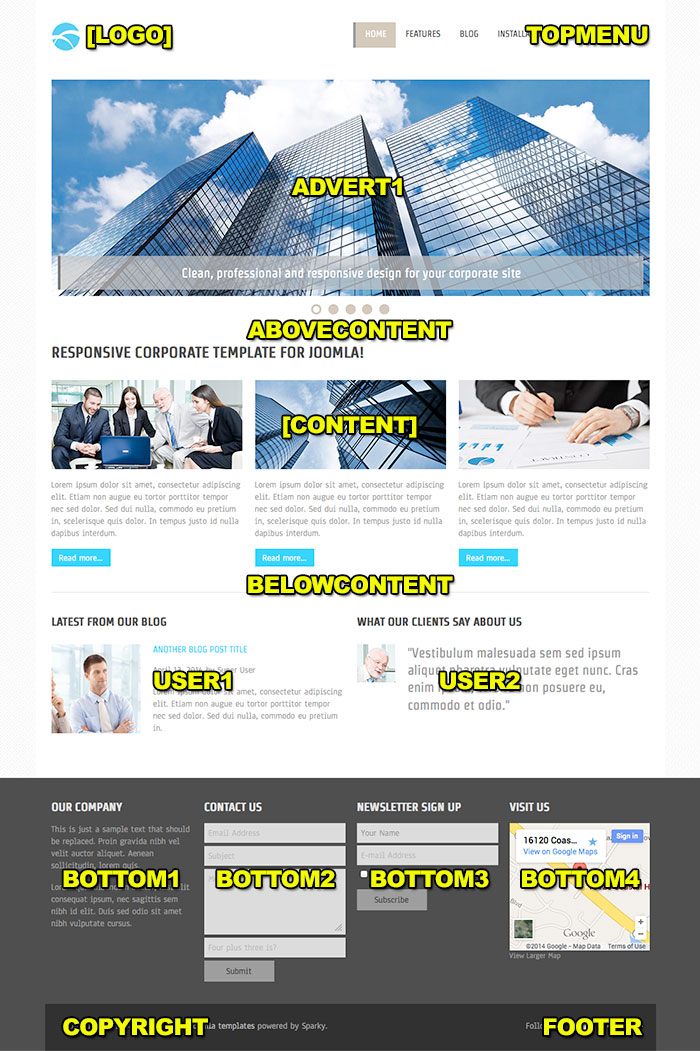
This template has support for 14 module positions. All module positions are collapsible. If no modules are published on some module positions, those module positions will automatically collapse.
Sparky framework allows you to add more module positions (if you need them) easily with user-friendly drag and drop technology. To check this, open template parameters and go to the Layout Designer tab.
The image that you can see on this page represents a "map" of all default module positions of Hot Politics template.
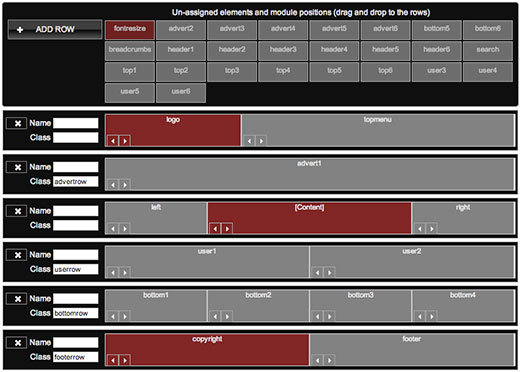 Adding new module positions and changing existing module positions is easy with Sparky's Layout Editor
Hot Corporate is responsive template for Joomla based on a clean and professional design. This template comes with our new responsive Joomla module, Hot Slicebox that you can see on the home page of the template demo. Corporate templates are very popular between our customers, so we decided to add one more to our collection. This template can be used for development of business websites. Clean and clear layout of elements as well as severity of entire website is recommended for responsive corporate sites.
Additional elements included with this template are Hot Slicebox, our new responsive module that we already mentioned. If you prefer old-style carousel for your home page, you can use Hot Full Carousel responsive module. Beside these, we included component for newsletters and contact module as we believe such features are necessary for corporate websites. The blog section of this template has an interesting and clear layout of company's blog posts.
This is a summarization of the template's features:
- Responsive template, based on clean CSS/CSS3 code, and powered by Sparky Joomla template framework.
- 5 pre-defined color styles. All colors are easily customizable from the Sparky options (infinite color options).
- Customization of the template's layout and adding/removing module positions is easy. It's powered by Sparky's drag'n'drop Layout Editor. Change layout and element's dimensions easily whenever you need.
- New Hot Slicebox responsive module, Hot Full Carousel and Hot Maps modules are included with Hot Corporate template. All commercial modules included in this template are free for you, if you buy template (you save $15 per module). This template also includes AcyMailer Free (newsletters) and Rapid Contact extensions. All extensions are styled and configured for using with this template.
- HotStart (SQL dump) available with both single purchase or membership plan. It copies template with all extensions and demo pages easily.
- 14 module positions are used in our demo. Unlimited number of module positions can be added easily within Layout Editor of Sparky Framework, if needed.
- PSD source file and fonts are available.
- Top menu with drop-down sub-levels.
- Tested with IE8+, Firefox, Chrome, Safari, Opera. Tested on iOS and Android mobile devices.
- Support for RTL (right-to-left) languages.
About Typography:
Take care about your typography to make better user experience for your readers. How to achieve that?
- Learn more about typography, escpecially about the most often used codes, such as <p>, <h1>, <h2>, <h3>, <img> and <a>.
- This template has valid XHTML, but if you want to keep it like that, you must learn and follow the XHTML principles. Also, if some of your extensions are not XHTML valid, pages based on this component would not be XHTML valid as well (no matter if template itself is valid).
- Familiarize yourself with CSS styles that comes with this template.
- Never copy/paste directly from layout text editors, such as Microsoft Word or OpenOffice. Try to paste text in plain editors first (such as Notepad).
- Use a WYSIWYG editor that comes with Joomla or install a better editor, but always check your code in the editor's HTML mode.
Heading One
Duis autem vel eum iriure dolor in hendrerit in vulputate velit esse molestie consequat, vel illum dolore eu feugiat nulla facilisis at vero eros et accumsan et iusto odio dignissim qui blandit praesent luptatum zzril delenit augue duis dolore te feugait nulla facilisi.
Heading Two
Duis autem vel eum iriure dolor in hendrerit in vulputate velit esse molestie consequat, vel illum dolore eu feugiat nulla facilisis at vero eros et accumsan et iusto odio dignissim qui blandit praesent luptatum zzril delenit augue duis dolore te feugait nulla facilisi.
Heading Three
Duis autem vel eum iriure dolor in hendrerit in vulputate velit esse molestie consequat, vel illum dolore eu feugiat nulla facilisis at vero eros et accumsan et iusto odio dignissim qui blandit praesent luptatum zzril delenit augue duis dolore te feugait nulla facilisi.
Heading Four
Duis autem vel eum iriure dolor in hendrerit in vulputate velit esse molestie consequat, vel illum dolore eu feugiat nulla facilisis at vero eros et accumsan et iusto odio dignissim qui blandit praesent luptatum zzril delenit augue duis dolore te feugait nulla facilisi.
My mother said to me, "If you are a soldier, you will become a general. If you are a monk, you will become the Pope." Instead, I was a painter, and became Picasso... To have a quote styled like that, use "blockquote" element, like in this sample code: <blockquote><p>...your text here...</p></blockquote>
This is a dropcap style applied to a paragraph of text. To use it, apply class of dropcap to your paragraph of text, in example: <p class="dropcap">...some text goes here...</p>. To edit this style, find class .dropcap in CSS stylesheet file template_css.css.
Notice Styles:
This is a warning message you may use in your text. Simply add appropriate class to your paragraphs to achieve this effect. Here's a sample code: <p class="warning">...your text here...</p>. The rest of text is just filler. Duis autem vel eum iriure dolor in hendrerit in vulputate velit esse molestie consequat, vel illum dolore eu feugiat.
This is an information message you may use in your text. Simply add appropriate class to your paragraphs to achieve this effect. Here's a sample code: <p class="info">...your text here...</p>. The rest of text is just filler. Duis autem vel eum iriure dolor in hendrerit in vulputate velit esse molestie consequat, vel illum dolore eu feugiat.
This is an error message you may use in your text. Simply add appropriate class to your paragraphs to achieve this effect. Here's a sample code: <p class="error">...your text here...</p>. The rest of text is just filler. Duis autem vel eum iriure dolor in hendrerit in vulputate velit esse molestie consequat, vel illum dolore eu feugiat.
This is typewriter style you may use in your text. Simply add appropriate class to your paragraphs to achieve this effect. Here's a sample code: <p class="typewriter">...your text here...</p>. This style uses a font with constant width of characters.
Paragraphs Marked with a Number/Letter:
1This is a paragraph of text marked with a big number or letter. To make such paragraph of text, you should enter number before the rest of the text in the paragraph, and wrap it in span with a class of p_number, like this: <p><span class="p_number">1</span>...your text here...</p>
2This is a paragraph of text marked with a big number or letter. To make such paragraph of text, you should enter number before the rest of the text in the paragraph, and wrap it in span with a class of p_number, like this: <p><span class="p_number">2</span>...your text here...</p>
AThis is a paragraph of text marked with a big number or letter. To make such paragraph of text, you should enter number before the rest of the text in the paragraph, and wrap it in span with a class of p_number, like this: <p><span class="p_number">A</span>...your text here...</p>
BThis is a paragraph of text marked with a big number or letter. To make such paragraph of text, you should enter number before the rest of the text in the paragraph, and wrap it in span with a class of p_number, like this: <p><span class="p_number">B</span>...your text here...</p>
Unordered and Ordered Lists
Unordered list sample:
- list element one
- list element two
- list subelement one
- list subelement two
- list subelement three
- list element three
- list element four
Ordered list sample:
- list element one
- list element two
- list subelement one
- list subelement two
- list subelement three
- list element three
- list element four
Arrow list sample:
- to achieve this effect
- add class "arrow" to UL
- like <ul class="arrow">
Arrow (left) list sample:
- to achieve this effect
- add class "arrowleft" to UL
- like <ul class="arrowleft">
Calendar list sample:
- to achieve this effect
- add class "calendar" to UL
- like <ul class="calendar">
Check list sample:
- to achieve this effect
- add class "checklist" to UL
- like <ul class="checklist">
Delete list sample:
- to achieve this effect
- add class "delete" to UL
- like <ul class="delete">
Email list sample:
- to achieve this effect
- add class "email" to UL
- like <ul class="email">
File list sample:
- to achieve this effect
- add class "file" to UL
- like <ul class="file">
Folder list sample:
- to achieve this effect
- add class "folder" to UL
- like <ul class="folder">
Hearts list sample:
- to achieve this effect
- add class "heart" to UL
- like <ul class="heart">
Information list sample:
- to achieve this effect
- add class "information"
- <ul class="information">
Lock list sample:
- to achieve this effect
- add class "lock" to UL
- like <ul class="lock">
Pencil list sample:
- to achieve this effect
- add class "star" to UL
- like <ul class="pencil">
Persons list sample:
- to achieve this effect
- add class "person" to UL
- like <ul class="person">
RSS list sample:
- to achieve this effect
- add class "rss" to UL
- like <ul class="rss">
Shopping basket list sample:
- to achieve this effect
- add class "shop" to UL
- like <ul class="shop">
Songs list sample:
- to achieve this effect
- add class "song" to UL
- like <ul class="song">
Star list sample:
- to achieve this effect
- add class "star" to UL
- like <ul class="star">
Star list sample 2:
- to achieve this effect
- add class "star2" to UL
- like <ul class="star2">
Trash list sample:
- to achieve this effect
- add class "trash" to UL
- like <ul class="tweak">
Tweaks list sample:
- to achieve this effect
- add class "tweak" to UL
- like <ul class="tweak">
Unlock list sample:
- to achieve this effect
- add class "unlock" to UL
- like <ul class="unlock">
Warning list sample:
- to achieve this effect
- add class "warn" to UL
- like <ul class="warn">
Inset Styles:
Block TitleDuis autem vel eum iriure dolor in hendrerit in vulputate velit esse molestie consequat, vel illum dolore eu feugiat nulla facilisi.To make such block of text, wrap it into a span with a class of inset-left. Optionally, inside this span you can add another span with class of inset_title for title. Here's an example: <span class="inset_left"><span class="inset_title">Title</span>...your text goes here...</span>. In a similar way, you can align the block of text to the right. Use inset_right, instead of inset_left. Block TitleDuis autem vel eum iriure dolor in hendrerit in vulputate velit esse molestie consequat, vel illum dolore eu feugiat nulla facilisi. If you need to change width or something else in those blocks, you can edit classes .inset_left and .inset_right in CSS stylesheet template_css.css.
Duis autem vel eum iriure dolor in hendrerit in vulputate velit esse molestie consequat, vel illum dolore eu feugiat nulla facilisi. Duis autem vel eum iriure dolor in hendrerit in vulputate velit esse molestie consequat, vel illum dolore eu feugiat nulla facilisi.
Latest From My Blog
-
Are local businesses doing this to you too?
October 15, 2015 by John Myers
I know we’ve all had them, that moment when something happens in your life that makes you say "Hmmm" or makes you more aware of something that you otherwise would have dismissed. My most recent ones were as a result of being introduced to Tammy Ferris by a friend of mine and her father-in-law Michael. They have recently created a new company, FounderShare. Foundershare is focused on the concept of helping local businesses take back Main Street and to get more people in a community to choose local. So why was this a "Hmmm" moment? Because it made me more aware of how important small businesses are in our community and as a result, I now find myself frequenting them more often.
Request Information
Copyright © 2026 Carroll Consulting. Developed by the MD TECH TEAM.
- Follow us:


